

Surface Detail Methods: Bump Shading and Displacement
2026-11-06
Surface Detail Methods: Bump Shading and Displacement
Surface Detail Methods can produce a visibly uneven appearance through different mechanisms. In Blender 4.4, bump mapping changes the shading response without changing the mesh surface, while true displacement changes the surface geometry. Reading a textured robot model therefore requires more than deciding whether the rendered image looks rough, ridged or deeply patterned.
Bump mapping derives a perturbed normal from height
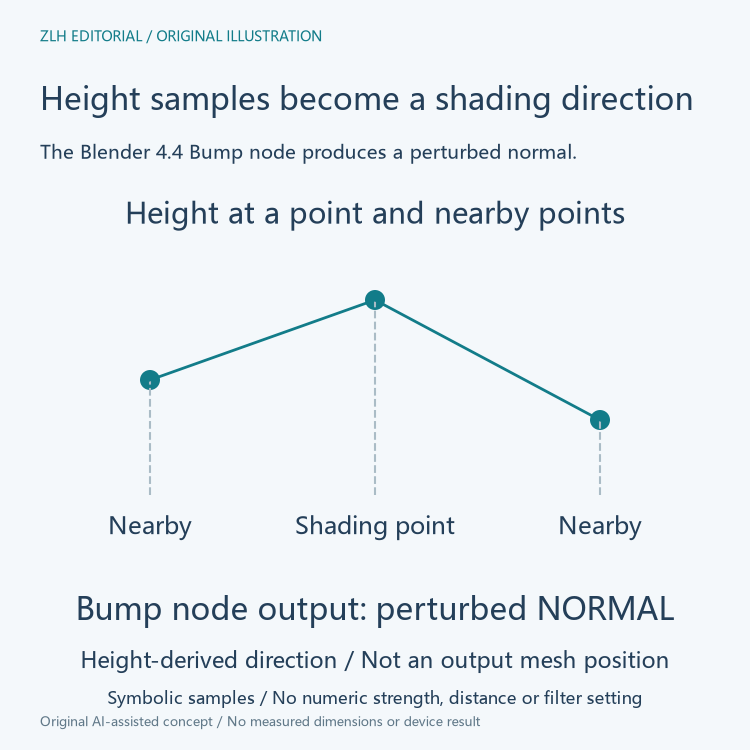
The official Blender 4.4 Bump node reference describes a perturbed normal generated from a height texture. It samples the height at the shading point and nearby points to determine a local normal direction. Height information therefore participates in a shading calculation rather than automatically becoming a new mesh position.
The local comparison matters. A height sample is not merely assigned as a surface color; neighboring samples help determine how the surface should face for shading. The output is a normal, which can alter the apparent response to illumination. The computation does not by itself state that an actual vertex has moved to the supplied height.
A normal output is different from a displacement output
The Bump node exposes a normal output and a normal input, alongside its height input. The official explanation also identifies strength and distance controls for the bump effect. These are properties of the bump calculation, not proof that a mesh has gained a corresponding physical thickness or a new outer boundary.
For a material summary, the useful record therefore names the height input and the normal output together. Those two labels expose the conversion from height information to a shading direction, rather than suggesting a direct transfer into vertex positions.
The documentation notes that when height is unconnected, the node can pass through its normal input or use the geometry normal by default. This behavior reinforces the identity of the output: the node belongs to the normal-shading relationship. The presence of a node named Bump in a material graph should be read with its connections and inputs.
True displacement changes the mesh surface
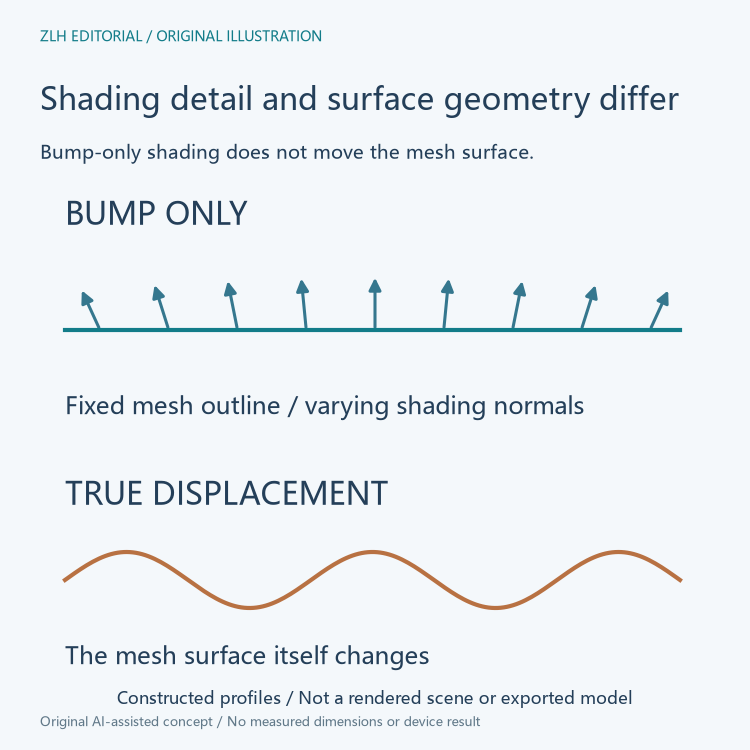
The official material displacement explanation separates Bump Only, Displacement Only and the combined method. It describes true displacement as applying the displacement to the mesh surface. Unlike bump-only shading, this method changes the surface represented by the geometry.
The manual associates true displacement with a finely subdivided mesh and potentially substantial memory use. The relationship follows the kind of detail being represented: geometric surface variation needs sufficient geometry, whereas a shading-normal variation can create apparent fine detail without the same mesh-surface change. More apparent detail in a render does not by itself reveal which method supplied it.
The silhouette exposes the difference in geometric roles
A conceptual side view can keep the mesh outline fixed while drawing varying shading-normal directions above it. That represents the role of bump-only detail. A second view can show the surface outline itself varying, representing the different role of true displacement. These are explanatory drawings, not results of a Blender scene or exported model.
The manual cautions that bump mapping can produce artifacts when the real geometry differs too greatly from the shape implied by the bump effect. The shading method can describe apparent local orientation, but it does not supply all the geometric consequences of changing the surface. That limitation explains why the distinction becomes more visible for larger shape differences.
Combined methods divide detail between mechanisms
The manual describes combining actual displacement for larger surface variation with bump mapping for finer detail. Both contributions can therefore appear within one material. A textured surface should not automatically be classified as exclusively bump or exclusively displacement just because one part of its visible pattern resembles a familiar example.
The combined arrangement also explains why the material's displacement method matters in addition to a texture's name. The same broad category of height information can participate in different calculations according to its connections and the selected method. Naming the image file height does not establish whether the final effect is a shading normal, changed surface geometry or both.
Keep shading detail separate from model-shape evidence
A clear robot-model explanation records the software version, the material method and the relevant data path. It can then distinguish a rendered appearance from the actual surface geometry being described. These fields communicate the mechanism more precisely than a single statement that the model has added surface detail.
Both complete Blender 4.4 reference pages were read on November 6, 2026. The original figures compare shading normals and geometric outlines without operating Blender or claiming a printed surface result. Related material appears in the robot modeling category and technical learning directory. Height-derived shading and true displacement remain understandable when their different outputs stay visible.


