

Robot Mesh Edge Marks: UV Seams and Shading Sharpness
2026-11-06
Robot Mesh Edge Marks: UV Seams and Shading Sharpness
Mesh Edge Marks in a robot illustration can describe texture organization, shading or another tool's influence. Two marks attached to the same visible edge are not interchangeable simply because both can make a boundary important. Blender distinguishes a UV seam from a sharp edge attribute. The first helps define discontinuities in the UV map; the second has a role in normal shading and can also be used by other tools. Reading those roles separately clarifies what a model's annotation actually describes.
Place the UV seam in texture space
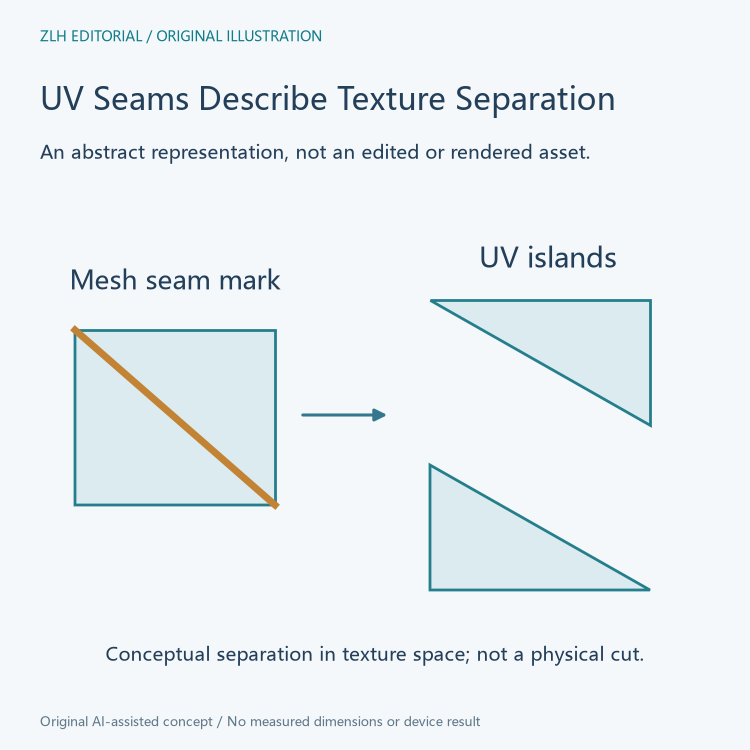
The official Blender 4.4 Seams chapter describes a UV map as discontinuous at seams. It uses a peeling-and-flattening analogy to explain how a surface can be represented in a flat texture layout. The boundary concerns the relationship between the mesh surface and the UV representation, rather than a cut through a manufactured robot part.
A learning handout should therefore distinguish a seam marked on the model from the resulting UV layout. The mark helps guide unwrapping; the layout is the corresponding texture-space representation. An image of a highlighted model edge alone does not show every UV island or establish which UV map a supplied material uses. Keeping these objects named makes a texture lesson easier to follow.
Understand the tradeoff behind additional seams
The chapter explains that more seams can reduce stretching while creating additional boundaries to manage during texturing. It also distinguishes projection painting from matching boundaries in a two-dimensional texture. These are connected design considerations: flattening a complicated surface and maintaining texture continuity are not identical goals.
For a robot illustration, a contributor might organize separate housing regions into a useful layout while considering where texture boundaries will be noticeable. That account should identify the intended representation rather than declare that every extra seam improves the asset. The documentation's tradeoff provides a more specific explanation than a general good-or-bad seam label.
Read the sharp mark as another edge attribute
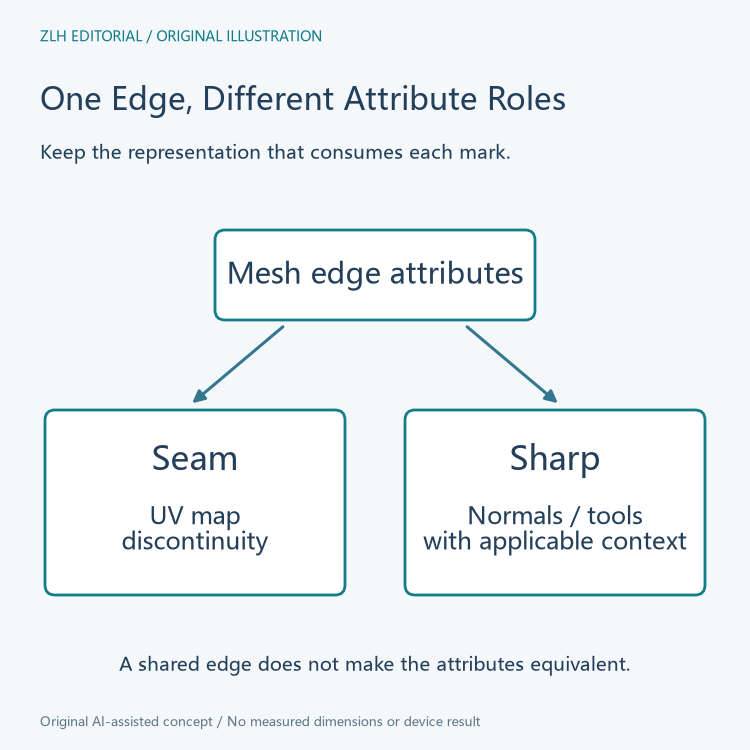
The official Edge Data reference separately describes Mark/Clear Sharp. It identifies the sharp edge attribute and explains its influence on normals appearing flat when smooth shading is enabled for the connecting face or object. The stated shading condition belongs with the explanation.
The same reference notes that modifiers and operators can use this attribute to mask their effects. A sharp mark consequently needs the relevant tool context. It should not be summarized as a universal instruction to cut geometry or split texture space. The UV-seam entry and sharp-edge entry identify different attributes with different documented roles.
Separate other edge properties from both marks
The Edge Data reference also gives edge crease and bevel weight their own descriptions. A bevel weight belongs to the attribute used by the Bevel Modifier to control its influence. A crease value has its own editing account. These entries illustrate why a generic heading such as edge setting loses useful information when the handout discusses more than one property.
An asset explanation can preserve the exact mark or attribute alongside the operation that consumes it. If an illustration compares a textured result with a shaded result, retain which property is relevant to each comparison. The two results may concern the same mesh while answering different representation questions. Shared geometry does not make their attribute names synonyms.
Keep an island boundary and an edge mark distinguishable
The Seams chapter describes a separate Seams from Islands operation that adds seam marks at the boundaries of existing UV islands. This relationship is useful evidence that a UV layout and its seam markings are related objects, rather than two names for one screenshot. A contributor's preparation history can explain whether marks guided an unwrap or were derived from existing island boundaries.
The chapter also permits multiple UV unwrappings for different areas or purposes. A handout should identify the map relevant to its texture explanation. A seam discussion becomes ambiguous if it switches between UV maps without saying so, even when the model's visible outline stays unchanged. Naming the intended map is a small addition with a clear practical benefit.
Review a robot-asset caption by its intended relationship
A useful caption can say that the seam account concerns texture-space discontinuity, while the sharp account concerns the documented normal or tool behavior. If a claim instead concerns geometry, that geometry needs its own explanation. This makes the lesson precise without turning a highlighted edge into a statement about a physical component's shape or finish.
Both Blender 4.4 chapters were read on November 6, 2026, including their conditions and separate attribute entries. No mesh was edited to prepare this article. The original diagrams illustrate representation relationships without copying a model or claiming a rendered result. Related material appears in the robot 3D learning collection and article directory.


